Rowlyx
Trail Stage
Trail Stage
Couldn't load pickup availability
Self-paced learning overview
- 💾 Digital file available after purchase
- 📚 Long-term availability
- 🔐 Secure checkout
- 🧾 Content updated in 2026
1. Problem Statement
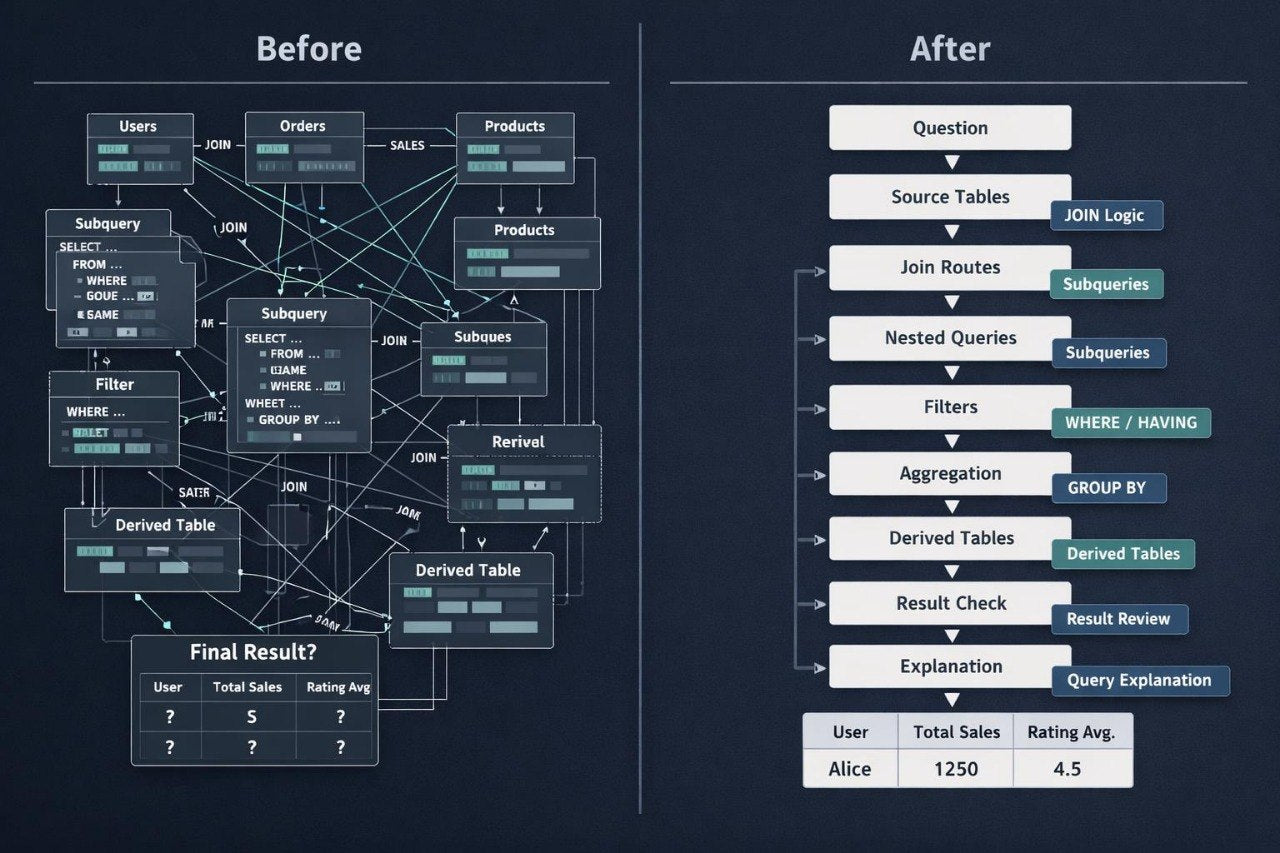
Struggling to build a full route from a task to a complete SQL query after learning core and mid-level topics? You’re not alone: when a study example includes several tables, conditions, JOIN, GROUP BY, subqueries, and result checking, it can be hard to keep the reasoning clear. Many learners know separate structures but do not always know which order to apply them in. It can also be difficult to explain why a specific query answers the original question. Trail Stage was created to help learners move through an SQL scenario step by step without adding commands randomly.
2. Solution
This course will teach you SQL programming through learning routes: from question wording to query building, intermediate checks, and final result reading. You will review how to divide a task into smaller steps, identify needed tables, choose fields, apply conditions, and check the logic of each stage. The materials show how to combine JOIN, GROUP BY, HAVING, subqueries, and summary tables within one learning scenario. You will learn not only to write separate SQL structures, but also to build a reasoning route around data. Trail Stage is suited for learners who want to work with more complex examples and explain their solutions more clearly.
3. What's Inside
- Module 1: Scenario Trail Map — a breakdown of how to start working with an SQL study scenario: identifying the question, expected result, needed tables, key fields, and main query logic.
- Module 2: Data Source Selection — an explanation of choosing data sources: how to understand which tables are needed, which columns matter for the task, and which relationships should be checked before writing the query.
- Module 3: Stepwise Join Route — building a join route: how to add tables gradually, check row count after each JOIN, and read intermediate results.
- Module 4: Filter Path Logic — working with conditions in longer queries: where to place WHERE, when HAVING is needed, and how conditions affect groups, rows, and final output.
- Module 5: Subquery Trail Blocks — using subqueries as separate route blocks: how to define their role, check the intermediate selection, and connect it with the main query.
- Module 6: Summary Table Building — creating summary tables through GROUP BY, aggregate functions, and joined data; explaining how to read the summary output in the context of the task.
- Module 7: Multi-Stage Practice Tasks — practice exercises where learners move through several stages: read the task, identify tables, build the query, check intermediate parts, and describe the final result.
- Module 8: Query Explanation Notes — materials for writing explanations: how to describe the role of SELECT, JOIN, WHERE, GROUP BY, HAVING, and subqueries in clear language.
- Module 9: Result Check Trail — a result-checking checklist: whether columns match the task, whether row count is reasonable, whether the join changed data unexpectedly, and whether conditions are suitable.
- Module 10: Common Trail Mistakes — a review of common issues in more complex examples: unnecessary joins, incorrect condition order, row duplication, unclear grouping, and incorrect summary reading.
- Module 11: Guided SQL Walkthroughs — step-by-step reviews of longer study queries with comments showing how each part affects the overall route.
- Module 12: Trail Review Pack — a set of review materials: short diagrams, self-check questions, query-reading exercises, and tips for working with complex SQL scenarios.
4. Who is this for?
✅ A good fit if you:
- have already worked with JOIN, GROUP BY, HAVING, and subqueries;
- want to build SQL queries more clearly from task to result;
- want to divide more complex examples into steps;
- work with several tables in one learning scenario;
- want to explain query logic more clearly;
- are looking for more practice with complete SQL routes.
❌ Not for you if you:
- do not yet know basic SQL query structure;
- are not familiar with JOIN, GROUP BY, or subqueries;
- are looking for a very short introductory material set;
- do not want to work with longer study examples;
- expect materials outside tables, data, and SQL queries.
5. What You'll Learn
- How to start an SQL scenario from the right learning question.
- How to identify needed tables and columns.
- How to add JOIN step by step and check the result.
- How to choose the place for WHERE and HAVING.
- How to use subqueries as separate logic blocks.
- How to build summary tables from several sources.
- How to check row count after each stage.
- How to find extra or missing records in the result.
- How to explain the role of each SQL query part.
- How to read more complex study examples without losing structure.
- How to compare the final result with the original task.
- How to prepare for broader independent SQL programming practice.
6. 30-day refund policy
The Trail Stage plan includes a 30-day refund policy according to the Rowlyx store terms. If the materials do not match your expectations or you need to clarify the return rules, you may contact the support team within 30 days after purchase. The request will be reviewed according to the store policy and order terms.
Are Rowlyx courses suitable for beginners?
Are Rowlyx courses suitable for beginners?
Yes, Rowlyx materials are created for step-by-step SQL programming study. A learner can begin with basic concepts such as tables, rows, columns, queries, conditions, and filtering. From there, the topics gradually move into table relationships, grouping, data analysis, and more detailed study scenarios. Each plan has a different depth of content, but all plans keep a calm and structured format.
Do I need previous experience with databases?
Do I need previous experience with databases?
For the starting plans, previous experience is not required. The materials explain how tables are structured, how rows and columns are read, how a simple SQL query is formed, and how basic conditions work. For higher plans, initial SQL knowledge may be helpful, but the explanations remain sequential. Rowlyx does not require learners to jump into complex topics from the first lesson.
What is included in the learning materials?
What is included in the learning materials?
Depending on the plan, learners receive lessons, modules, SQL query examples, practice exercises, study notes, checklists, and self-review materials. All content is created to help learners better understand the logic of tables, relationships, filters, grouping, and query building. Materials can be studied at a personal pace, with the option to return to topics when needed.